Introduction to Reporting Software
In our data-driven world, businesses gather more information than ever before. But raw data alone is not much use. To make smart decisions, you need clear insights. That is where reporting software comes in. Reporting software turns information into understandable charts, tables, and reports. It can uncover and highlight insights that might not be obvious from just looking at the raw data. It saves time, reduces errors, and helps you see the truth about your business. Whether it’s financial reporting software that tracks profits and losses, or incident report software that records workplace issues, these systems keep your operations running smoothly and transparently.
This guide takes a deep look at reporting software, its benefits, types, and challenges. It also explores what makes a great system and when custom-built reporting software might be the right choice for your business.
Understanding Reporting Software
Reporting software helps companies turn complex data into simple to understand information. It connects to different systems, such as sales, accounting, production or stock control and collects facts from them. Then it organises that data into charts, tables, dashboards, and documents that anyone can easily analyse.
At its heart, reporting software is about communication. It translates numbers into stories that show what’s working and what’s not.
For example:
- 🛍️ A retailer might see which products sell best each week and which need a price change.
- 🏗️ A builder might track project costs against budgets to stop overspending.
- 🏥 A care home might review health and safety incidents to improve training or safety procedures.
The goal is to help you make decisions with confidence, not guesswork.
Types of Reporting Software
There are several types of reporting software, each built for different business needs. Here’s a simple overview:
| Type | Main Purpose | Example Uses |
|---|---|---|
| General Business Reporting | Pulls together data from multiple systems to create company-wide insights | Sales trends, staff performance, stock levels |
| Financial Reporting Software | Focuses on accounting, budgets, and financial planning | Profit and loss reports, forecasts, tax summaries |
| Operational Reporting | Tracks daily processes and performance | Production output, delivery times |
| Incident Report Software | Records, manages, and analyses workplace or safety incidents | Accident tracking, compliance records |
| Customer Reporting | Analyses customer activity and satisfaction | Service response times, client retention |
Each type has a clear purpose. But many modern tools combine these functions in one platform, giving a fuller view of business health.
The Benefits of Reporting Software
When set up correctly, reporting software can transform the way a business works. It improves accuracy, saves hours of manual work, and gives you a clear picture of performance.
Here are some of the advantages. We explore more benefits, later in this post, when we discuss the key elements of a good reporting system.

- ✅ 📊 Better Accuracy: Automated reports reduce typing mistakes and ensure figures are always correct.
- ✅ ⏱️ Time Savings: Reports that once took days can now be created in seconds.
- ✅ 📈 Clear Visuals: Charts and dashboards make it easy to understand complex information.
- ✅ 🔒 Safer Data Management: Reports can be stored securely, shared safely, and backed up automatically.
In short, reporting software helps avoid surprises, reduces errors, and supports confident, informed decisions.
Common Challenges
While reporting software has many advantages, it is not without its challenges. Many businesses struggle with systems that do not fit their needs or are too complicated to use.
Here are some typical pain points:
- ⚠️ Data silos: When information is trapped in separate systems that do not talk to each other. This makes it hard to see the full picture.
- ⚠️ Outdated tools: Older legacy software can be slow and unreliable. They may not connect well with newer apps.
- ⚠️ Manual work: Some teams still rely on spreadsheets. This leads to duplicated effort and a higher risk of mistakes.
- ⚠️ Limited flexibility: Off-the-shelf reporting software can be rigid and may not reflect the way your business really operates.
- ⚠️ Poor training: Without proper guidance, staff may not use the software to its full potential.
Businesses often feel the impact of these problems when they cannot get timely or accurate insights. Reports may take too long to prepare, contain errors, or fail to show what managers really need to know.
Common Examples of Reporting Software
There are many kinds of reporting software, each designed for a different part of business life. To show how varied these systems can be, we will now look in detail at two common types, financial reporting software and incident report software.
These two examples show how reporting tools can handle both numbers and people-related data, each in its own way, while following the same goal: clear, accurate information that drives better decisions.
Financial Reporting Software
Financial reporting software is one of the most used forms of reporting systems. It helps businesses keep track of income, spending, and profit. It also supports planning by forecasting future results based on past figures.
Good financial reporting software should make complex tasks easier, such as balancing accounts, forecasting budgets, and managing tax records. It gathers data from invoices, payroll, and bank feeds into one clear dashboard so that anyone can understand the financial health of the business at a glance.
Some well-known examples of financial reporting software include Xero, QuickBooks, Sage, and FreshBooks. These are popular because they’re reliable, easy to use, and offer a wide range of reporting tools that cover day-to-day accounting. They allow you to track revenue, manage expenses, and generate standard financial reports quickly.
However, many businesses already use one of these tools and do not want to start over from scratch. The good news is that instead of “reinventing the wheel”, custom-built reporting software can often work alongside your existing systems using APIs.
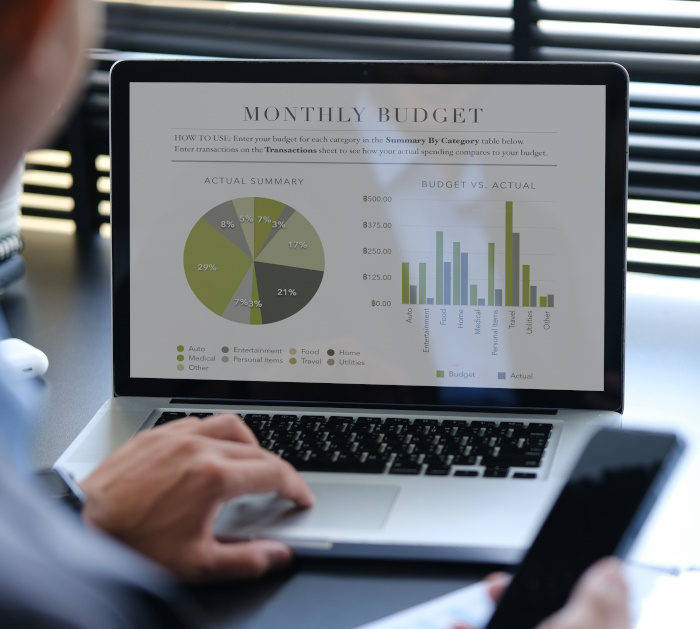
An API (Application Programming Interface) is a digital bridge that allows one piece of software to “talk” to another. For example, if your business uses Sage for accounting and you decide to build a custom reporting dashboard, the two systems can be connected through an API. This means your new system can pull live financial data directly from Sage without manual input. You continue to use your trusted platform, while your new custom solution enhances it, providing smoother workflows and new insights.
This approach gives you the best of both worlds: the reliability of proven financial tools and the flexibility of a custom system that fits your exact needs.
Typical Features of Financial Reporting Software
| Feature | What It Does | Why It Matters |
|---|---|---|
| Automated Reports | Creates real-time financial summaries | Saves time and reduces errors |
| Budget Forecasting | Predicts income and spending | Supports planning and cash flow control |
| Tax and Compliance Tools | Tracks VAT, payroll, and expenses | Helps you meet legal obligations |
| Integration with Accounting Systems | Links with existing financial tools | Keeps all figures consistent |
| Performance Dashboards | Shows trends in revenue and costs | Aids quicker decision-making |
Benefits of Financial Reporting Software
Financial reporting software gives business owners peace of mind. Instead of chasing paperwork and updating endless spreadsheets, they can focus on running the business. It also makes it easy to produce accurate reports whenever they’re needed.

Benefits of financial reporting software:
- Reports are available instantly
- Reduces manual work and errors
- Saves time and improves efficiency
- Keeps financial information organised in one place
- Helps with better decision-making
- Makes audits and compliance easier
- Improves accuracy and reliability
- Supports clear reporting for investors and stakeholders
Incident Report Software
Every business faces incidents at some point: workplace accidents, security breaches, equipment faults, or health and safety issues. Incident report software helps you record, track, and manage these events properly.
This kind of software is common in sectors like construction, healthcare, education, logistics, and manufacturing. It creates a record of what happened, when, and why. Managers can then analyse the data to find patterns and reduce risks.
Without good incident report software, small issues can easily be missed. Paper-based systems can get lost or delayed, and staff may forget to log details. In contrast, digital reporting tools make the process fast, secure, and accessible from anywhere.
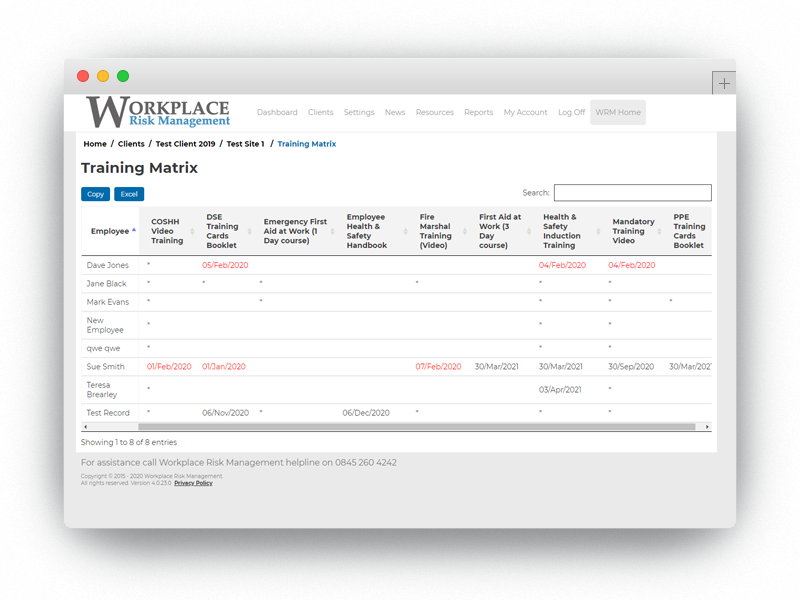
It allows you to:
- 🔹 Log incidents immediately from any device: Staff can report accidents or issues straight away from their phones, reducing delays and forgotten details.
- 🔹 Assign follow-up actions and deadlines: Once an issue is logged, managers can create tasks to fix the problem, assign them to staff, and set reminders to ensure nothing is missed.
- 🔹 Track investigations and outcomes: Each case can be updated with notes, attachments, and outcomes, giving full visibility into how incidents are handled.
- 🔹 Generate reports for audits or compliance checks: Reports can be created instantly to show proof of safety standards or regulatory compliance.
Together, these features promote accountability and help build a safer, more organised workplace.
Case Study: WRM Workplace Risk Management
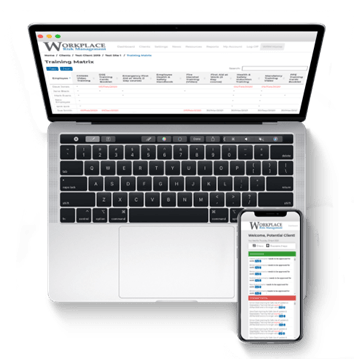
Our client, Workplace Risk Management (WRM), came to us needing a full digital transformation. They wanted to replace their generic off-the-shelf software system, with a single online platform that allowed clients to record accidents, manage staff training, and stay compliant with health and safety laws.
We built a custom web application that lets WRM’s clients log in securely and manage every aspect of workplace safety. Within the platform, users can record incidents, track training progress, and download essential documents; all in one place. The system works on any internet-enabled device, so clients can report issues straight from the field.
Since launching, WRM’s clients have found the system faster and easier than their previous ready-made software system. They can provide instant evidence of compliance to inspectors, and WRM’s staff now have complete oversight of their clients’ activity through a central dashboard. This transformation has not only improved efficiency but also increased client satisfaction.
You can read the full case study on WRM’s digital transformation here.
Elements of a Good Reporting Software System
A good reporting system is more than just a set of charts. It’s a tool that helps people make informed decisions quickly. The best reporting software combines clarity, functionality, and dependability. Below, we expand on the most important elements to look for.
💡 Ease of Use:
If a system is too complicated, people will avoid it. A clear layout, simple navigation, and plain language make a big difference. Staff should be able to find what they need without lengthy training sessions. Look for systems with drag-and-drop features, custom filters, and easy-to-read dashboards.
🔗 Integration:
Reporting software should connect smoothly to the tools you already use. For instance, linking your CRM, HR, and accounting platforms allows you to pull all the data you need without manual copying. Integration reduces errors and ensures all departments work from the same information.
🔁 Automation:
A strong reporting system updates reports automatically as new data arrives. This removes the need for constant refreshing or re-importing files. Automated alerts can also highlight changes or trends, allowing managers to act quickly.
🔐 Security:
Security is vital when dealing with sensitive data. Good reporting software includes role-based access, password controls, and encrypted connections. This protects confidential information and ensures that only authorised people can see it.
📱 Accessibility:
Modern reporting tools should work on desktops, tablets, and phones. This allows teams to check reports on the go. Remote access has become standard, helping managers stay informed wherever they are.
📏 Scalability:
Your business will change over time. The right system should grow with you, handling more users, data, and reports without slowing down. A scalable platform avoids the need for costly replacements in the future.
When these elements come together, your software becomes a reliable partner rather than a frustration. It saves time, improves accuracy, and gives your team confidence in the numbers they see.
When Custom Reporting Software Makes Sense
Ready-made tools work well for many businesses, but not for everyone. Some organisations have specific ways of working or special data needs that standard software can’t manage. In these cases, custom reporting software is often the best solution.
A custom system is designed around your business. It fits your exact processes, links smoothly with your existing systems, and displays the information that really matters to you.

At BSPOKE Software, we often meet companies who have tried several off-the-shelf products to get all the features they need. They end up running three or four systems that don’t fully connect or fulfil all their requirements. The unique nature of custom-built software removes that problem, giving you one joined-up solution that does everything you require, in one place.
Case in Point
We mentioned WRM earlier in this post, but we are bringing them up again, because they are a great example of how custom software can meet needs that off-the-shelf systems simply can’t. WRM were not recording their own health and safety incidents, instead they needed a way to help other companies track theirs. This meant they required something very different from standard software.
Most ready-made incident reporting tools are designed for a single company’s internal use, not for managing multiple clients. Because of this, the pre-built systems WRM tried were unsuitable. Our custom-built incident report software gave them the flexibility to manage hundreds of client accounts and made health and safety management far easier for the businesses they support. It also allowed them to add specific and unique features such as video training and questionnaires.
Advantages of Custom Reporting Software
| Advantage | Impact on Business |
|---|---|
| Full Integration | Data from all systems appears in one place |
| Tailored Dashboards | Managers see only the information that matters |
| Better User Experience | Interfaces designed for your team’s exact needs |
| Flexible Growth | Easily adapted as your business changes |
| Long-Term Value | No licence limits or unwanted features |
Custom reporting software often costs more at the start, but it pays off over time. You get a system that fits like a glove, rather than forcing your team to work around software that doesn’t suit them.
Imagine a logistics firm that tracks vehicle performance, fuel use, and delivery times. Off-the-shelf systems might show the basics, but a custom-built platform could combine live GPS data, driver behaviour, and maintenance records. Managers would see real-time performance, predict breakdowns, and save on costs.
That is the real power of a tailored system.
The Future of Reporting Software
Reporting software is changing fast. The next few years will bring smarter tools that do more of the heavy lifting.
Artificial intelligence is already starting to analyse trends automatically, spotting risks or opportunities before humans notice them. Predictive analytics will help managers plan more effectively, not just react to the past.
Cloud-based platforms mean teams can access reports from anywhere, sharing insights instantly. Mobile access will become the norm, not the bonus. And as data privacy laws grow stricter, secure and compliant systems will be more important than ever.
For many, the future lies in hybrid setups: core systems for standard reports, plus custom reporting software for the unique parts of their business.

Choosing the Right Reporting Software
Selecting the right reporting software is one of the most important technology decisions you’ll make. The perfect system isn’t the one with the most features; it’s the one that fits how your business actually works.

Start by thinking about your goals. What do you need to understand better? For example:
- Do you struggle to see up-to-date financial results?
- Are you wasting hours copying data from one system to another?
- Do staff find it hard to access the reports they need?
- Are your current reports too general or missing key details?
- Do you rely on spreadsheets that only one person fully understands?
The answers to these questions will help you define your priorities.
Next, consider your future plans. Ask yourself:
- Will this software still meet our needs in two years?
- Can it grow with us as we add new teams or services?
- Does it link to the other tools we use, like accounting or CRM systems?
- How easy is it for non-technical staff to learn and use?
When reviewing options, look closely at how each product handles integration. A system that works well today but cannot connect with others tomorrow may soon cause frustration.

Off-the-shelf tools like Power BI, Tableau, or Google Data Studio can be excellent for general use. But if your business processes are unique or if you rely on several different systems, you might benefit from a custom reporting solution instead.
A tailored build can connect all your data sources, present reports exactly how you want them, and evolve as your business changes. At BSPOKE Software, we help clients create systems that match their exact goals, not someone else’s.
Before choosing, take time to talk to potential providers, see demos, and ask detailed questions about integration, support, and future upgrades. For a quick informal chat or to set up a free software consultation, tell us a bit about your company and your requirements, by filling in our contact form. The right decision now will save you years of frustration later.