
Understanding the Basics
When you’re thinking about building a new software system for your business or already have one and are looking at making changes, you may hear the terms monolithic and microservices. These simply describe how the software is put together, how it runs, and how it grows over time. Knowing the difference can help you choose the right approach and feel confident that you’re making the best decision for your business.
In this guide, we’ll explain what each approach means, where each one fits, and what the pros and cons are. We’ll also cover how these choices can affect cost, speed, flexibility and risk. We will mention custom software where this is applicable but the main focus is on understanding the approaches themselves in simple language.
👉 You can find more general and in-depth information about custom software on our home or FAQs page.
What Do Monolithic and Microservices Really Mean?

A good way to picture these two approaches is to think about how houses are built.
- Monolithic is like a traditional brick house built all in one piece. The walls, roof, plumbing, electrics – all form one solid structure. If you need to change the wiring in one room, you may end up opening up several walls just to reach it.
- Microservices is more like a group of modular cabins connected together. Each cabin is self-contained with its own wiring, water supply and insulation. If you want to upgrade the kitchen cabin, you can do so without touching the bedrooms.
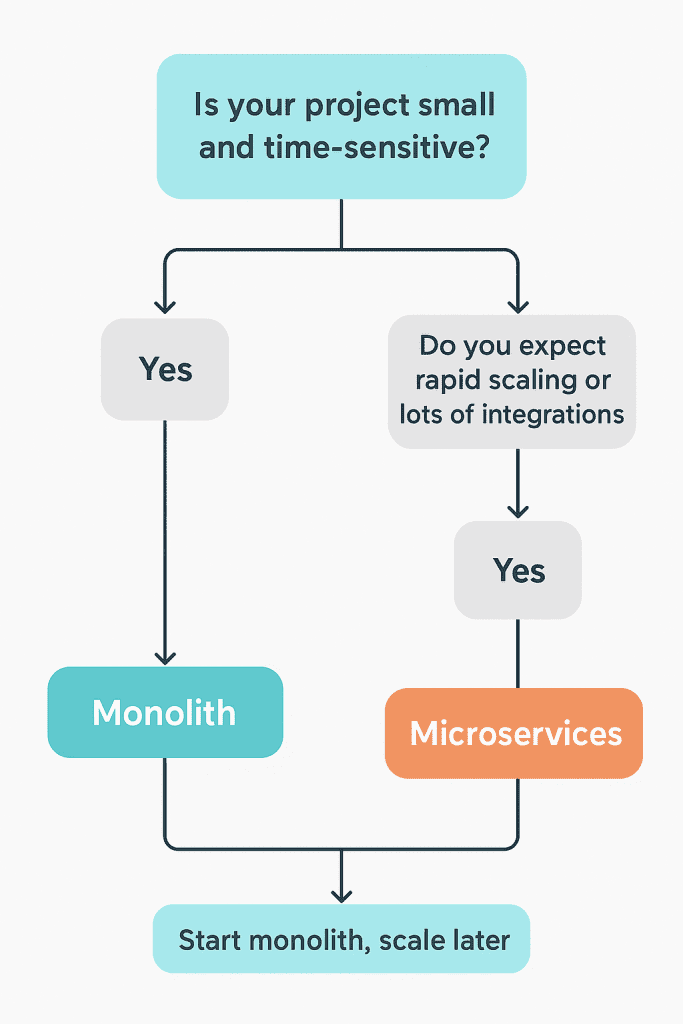
In software:
- Monolithic architecture – The application is built as one single unit. All parts – the user interface, the business rules, the database connections – are packaged and deployed together. Updating one part often means redeploying everything.
- Microservices architecture – The application is split into many smaller, independent services. Each service handles one job (for example payments, user management, search) and can be updated or scaled on its own. These services talk to each other through simple connections called APIs.
So, the real difference is one big, tightly linked system versus several smaller parts working together.
Why the Difference Matters
Your choice will affect your business in several ways:
- ⏱ Speed to market – How quickly you can build new features or launch updates.
- 💷 Cost – Not just to build the system, but to keep it running and host it.
- 🔧 Flexibility – How easily you can change parts of the system or add new technology.
- 🛡 Reliability & risk – How much downtime you face if something fails and how easily issues spread.
- 📈 Scalability – How smoothly your system can grow as you gain more customers and data.
If you choose custom software with BSPOKE Software, these factors will shape how we navigate the software development lifecycle, including: design, test, launch and maintenance.
Pros and Cons: Side-by-Side Comparison
Here’s a clear comparison of what you gain and what you give up with each approach.
| Aspect | Monolithic | Microservices |
|---|---|---|
| Initial speed & simplicity | ✅ Fast to build a first version. Fewer moving parts, easier to test and launch because everything is together. | ⚠️ More complex to set up. Many services to define, with more work in deployment and monitoring. |
| Scaling | 🔻 Scaling is all-or-nothing – you need to scale the entire system even if just one part is busy. | ✅ You can scale only the part under pressure, making better use of resources. |
| Flexibility | 🔷 Harder to change or use new technology because everything is tied together. | ✅ Easier to upgrade just one service or use different technology for different services. |
| Risk & reliability | 🔻 A problem in one part can bring the whole system down. Small updates can affect unrelated features. | ✅ Problems are contained within one service, so the rest keeps running. |
| Maintenance & cost | ✅ Simple to maintain early on. Fewer servers, fewer tools to monitor. | ⚠️ More services mean more to maintain, monitor and test. Costs can rise with complexity. |
| New features | ✅ May be faster to add simple changes when the system is small. Slows down as it grows. | ✅ Once running, you can add features to individual services quickly. |
| Infrastructure cost | 🔻 Can need powerful servers for the whole app even if only part is busy. | ⚠️ Can use more total infrastructure, but lets you fine-tune where you spend. |
| KEY: | ✅ Positive benefit 🔷 Moderate/neutral effect | ⚠️ Setup or ongoing challenge 🔻 Limitation |
When Monolithic Works Well (and When it Starts to Struggle)
Here are scenarios to help you judge whether monolithic may suit you now, or whether it’s going to cause problems in the future.
When monolithic is a good fit:
- You’re launching a new product or MVP (minimum viable product), you want to test your idea quickly.
- The scope is small: not many features, not anticipated huge user base or rapidly evolving functionality.
- Budget is limited, and you want to keep things simple.
- Your team (or your development partner) has more experience with simpler, unified systems rather than complex distributed ones.

When monolithic typically starts to struggle / you’d consider moving to microservices:
- As the system grows, you find deployments take a long time (even for small changes).
- Bug fixes or changes in one part often break other parts.
- Performance issues in one feature (e.g. search, or payment) affect the whole system.
- You want to adopt new technology (e.g. a new database, a new programming language) but putting it into the monolith is risky or difficult.
- You expect rapid growth in users, scale, or new business units; or you expect to expand into new regions, integrate with lots of third-party services.
Exploring microservices: What you Gain and What Extra Work is Required
Microservices bring advantages, but they also introduce new challenges. Before choosing microservices over a monolith, it helps to understand what extra you have to handle.
What you gain with microservices:
- Independent services can be deployed, tested, updated without deploying the whole system. Enables faster iteration.
- Better fault isolation: a failure in one service doesn’t automatically take the whole system down.
- Ability to use the best tool for each job: different languages, databases, frameworks where most suitable.
- More scalable: only scale pieces that need it. Cost-efficient over time especially in high-growth or variable load scenarios.
- Helps large employers: different teams can own different services, this promotes clearer boundaries and reduces friction.
What extra work (or risk) microservices require:
- More complex infrastructure: you need tooling to manage communications between services (APIs, message queues), deployment pipelines, monitoring, logging, error tracing.
- More testing complexity: not only each service needs tests, but you need to test how they interact; end-to-end testing can be harder.
- Deployment & DevOps overhead: you may use containers or orchestration tools (like Docker, Kubernetes), so operations cost and complexity go up.
- Data management challenges: often each microservice has its own data store; synchronisation, consistency, data duplication or data integrity can cause issues.

Migration: Moving from Monolithic → Microservices (if Needed)
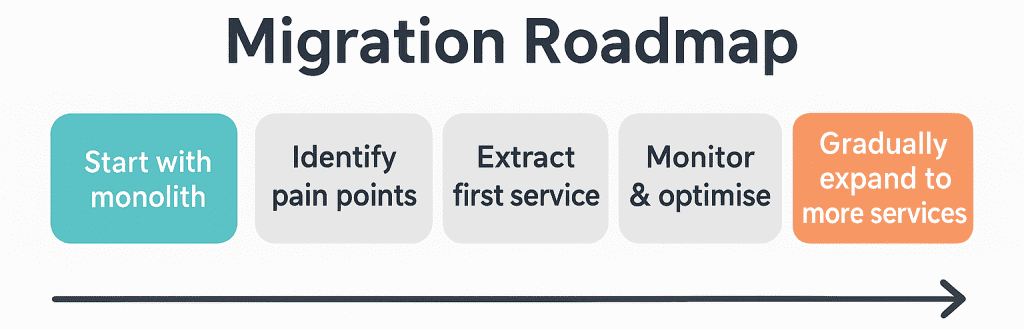
If you already have a monolithic system and find yourself bumping into limits, such as slow deployment, hard to change functionality, scaling problems, it might be time to consider migrating. Here are some ideas for doing so safely:
- Incremental migration: Don’t try to split everything at once. Start with the parts under the most strain (e.g. payment module, search, reporting, etc).
- Define clear service boundaries: Understand which features make sense to separate (business domains), avoid splitting too finely such that overhead outweighs gains.
- Maintain compatibility and continuous operations: While you extract services, keep the system working end to end; avoid long periods of downtime.
- Invest in automation and monitoring early: Logging, tracing, deployment automation matters a lot more when you have many services.
- Manage data wisely: Data access, schema changes, database design for services needs thought: whether services share databases, whether to duplicate data, whether to keep transactional integrity.
Custom Software, How this Applies
When you engage a custom software company (for example, BSPOKE Software), these architecture decisions become part of the foundation work. Here is how they relate in your case:
- If you are commissioning a system from scratch, you’ll need to decide (together with your developer) whether a monolithic approach is enough or whether microservices make sense. It might cost more initially if going microservices, but might save you cost, issues, and delays later.
- If you already have bespoke software, some parts might already resemble microservices architecture; others may be tightly coupled monoliths. It is possible to convert or “decompose” parts into services over time.
- The architecture choice will impact how your developer structures contracts, estimates, planning, maintenance, updates.
- You’ll want the software built such that it can grow with your business without requiring a complete rebuild, if possible.
💡 Tip: Your software partner can help assess whether microservices are right for your business. Get in touch with BSPOKE, today!
Real World Examples

Small business, new product: Imagine a business wants a stock control system with orders, invoices, users. They plan only local usage, maybe some online customers, but not expecting a huge scale up anytime soon. Monolithic approach is faster, cheaper, simpler.
Growing e-commerce or high traffic website: Suppose your shop grows, you want to add recommendations, search ranking, mobile app, analytics, perhaps push notifications. Some parts (like search or recommendations) may need more resources. Microservices lets you scale those parts without scaling all.


Legacy system renovation: You have a 10-year-old monolithic system with tangled code, slow updates, frequent bugs. You might begin by extracting some modules/functions into microservices, for example reporting, or billing, so that they can be updated or scaled separately.
Common Microservice Misconceptions and Pitfalls
Over-Engineering Too Early
Many businesses rush into microservices because it sounds modern and advanced. But breaking everything into small services before you really need them can slow down development and burn through budget unnecessarily. It is often better to start with a simple, well-structured system and split it later when the benefits outweigh the cost.
Splitting into Too Many Tiny Services
Microservices should make your system easier to manage, not harder. If you split the application into too many small services, you create extra work for your team. Each service needs to be monitored, deployed, and maintained, and the constant communication between them can slow things down.
Forgetting About Operations
Building software is only half the job. You also need a plan to run it smoothly every day. With microservices, you have many moving parts, so deployment automation, monitoring, logging, and security checks must be in place. Without these, finding and fixing problems becomes much harder.
Keeping Data Consistent
When there are many separate services, each one might have its own database. This can make keeping data accurate and up-to-date more complicated. If one service is slow or fails, it could leave your data in an unfinished state. Careful design and planning are needed to avoid this.
Team Knowledge and Skills
Microservices require experience to manage well. If your software partner or in-house team doesn’t understand how to handle them, the system can become slow, unreliable, or very costly to maintain. Training and choosing the right development partner are crucial steps.
When to Choose Microservices from the Start
- 💡 If you expect rapid growth – such as many users joining quickly, expanding into new regions, or needing a lot of features – starting with separate services can make sense.
- 📈 If you know certain parts of your system will face heavy traffic, such as frequent payments, busy search functions, or lots of API calls, using smaller services can help spread the load and keep everything running smoothly.
- 🛠️ If you are planning for software that will last for many years, with regular updates, new features, and improvements, having a service-based approach can make maintenance easier.
Even in these cases, it is often smart to start with a simple core system first and then break it into smaller services gradually, rather than building everything as separate services from day one.
Final Thoughts and Takeaways
Choosing between a single, tightly built system and a network of small, connected services is not about right or wrong. It all depends on your business goals, your scale, your budget, and where you see your company heading in the future.
As we’ve discussed above, many businesses benefit from starting with a simple, well-structured core system and evolving to microservices when growth demands it. This staged approach reduces risk and cost early on while preparing you for the future.
Many businesses actually find a middle path works best. They begin with a carefully structured, single system and later split off services step by step as their requirements become clearer.
Taking time to think about your system design early on will pay off in the long run. It might seem like technical talk, but these choices affect how fast you can react to change, how reliable your systems are, how much you spend, and how smoothly your operations run.
👉 BSPOKE Software can guide you through this decision and help you design the right foundation for your future growth. Speak to us today to get expert advice tailored to your needs.