What does Scalability Mean?
When we talk about scalability in software, we mean the ability of a system to expand and adapt as your business grows. As a managing director or business owner, expanding your company can be exciting but also worrying, as it brings fresh challenges and unpredictability. The last thing you need at this crucial time is for your software and technology to let you down.
Whether you are increasing staff, upscaling production, taking on a larger contract than usual, or moving into a new area of work, a scalable software system should be able to cope without you having to throw everything away and start again. That might mean supporting more users, holding larger amounts of data, or adding new functions. Instead of replacing your system every time your business changes, scalability lets you build on what you already have.
At its core, scalability is about strength and how flexible the software system is. It gives business owners the confidence that when new demands appear, their software solution will keep running smoothly. Without scalability, growth can become stressful, disruptive and expensive.
Is Custom Software Scalable?
Yes, custom software is often the most scalable type of software you can choose. Because it is built specifically for your business, you control how it is designed and how it grows. This means you can plan for scalability from the very beginning, avoiding many of the limitations that come with off-the-shelf or SaaS products.
Other approaches as mentioned above, may work well at first and in the short term are often the less expensive and quicker to initially setup. However, in the long run they can become restrictive and more costly, especially if your business grows. They are typically designed for the “average” business, which means you may end up paying for features you don’t need while missing the ones you do. Scaling them usually means either upgrading to a more expensive tier, re-engineering the system, or replacing it altogether.
Custom software, by contrast, allows you to choose the architecture that fits your growth plans. This flexibility lets you expand step by step, adding users, features, and integrations without starting again from scratch.
The Benefits of Scalable, Custom Software
Custom software gives you more control over scalability than off-the-shelf tools. Here are the main benefits:
- 🎯 Tailored to Your Business – Custom systems are built around your exact processes, so you avoid paying for unnecessary features. They let you choose the right architecture and data model for your business, leading to better performance and easier growth.
- 🔗 Smooth Integration – Custom software integrates with third-party tools such as accounting systems (e.g., Xero, QuickBooks, Sage) or CRMs, so you don’t end up with disconnected systems. This ensures your data flows smoothly across all areas of your business.
- 🛠️ Easier Feature Expansion – With a custom system, adding new services or tools doesn’t mean starting again. You can add features step by step, so growth is controlled and less disruptive.
- 💰 Lower Long-Term Costs – Although custom software usually costs more upfront, it saves money over time by reducing the need for full system replacements, retraining, and expensive workarounds.
- 📈 Supports Digital Transformation – Planning and building for scalability is part of a wider digital transformation strategy. It sets your business up for success by making sure technology supports growth instead of holding it back.
Case Study: Expanding Without Starting Over
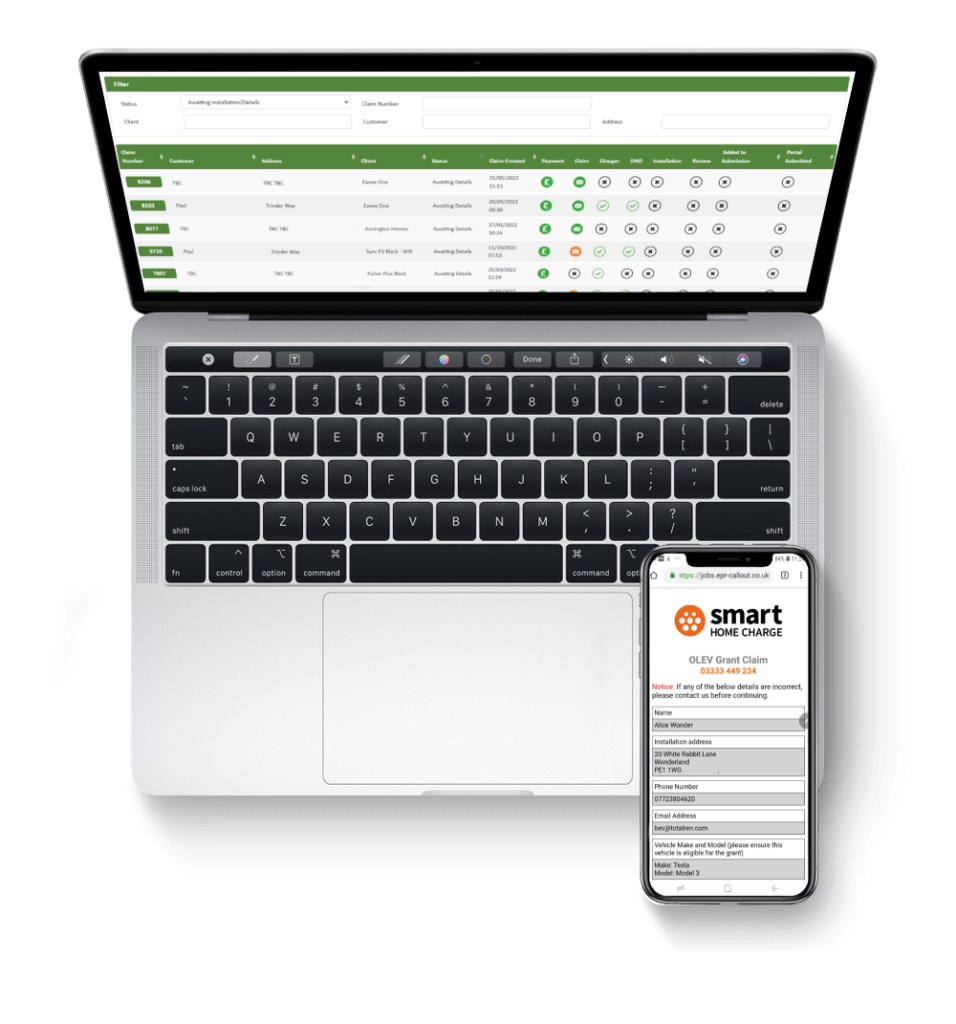
One of our clients was an electrical and plumbing repair company that relied on a custom-built job management system for bookings, engineer tracking, and reporting.
When they expanded into EV charger installation, we added new functionality into their existing system. This avoided the cost of building a new platform from scratch and kept staff training minimal, since employees were already familiar with the software.
The result: faster rollout of the new service, lower costs, and smoother operations; all thanks to a scalable, flexible software foundation.
What Does Software Scalability Mean? Common Software Approaches Explained
When planning your software system, for business growth, it helps to see the options at a glance before diving into the detail. The summary table below gives a quick overview of the most common software approaches, how they scale, and where they work best. After the table you’ll find a full explanation of each approach with clear, practical examples.
How to use the table and choose an approach
- Use the table for a quick comparison when you’re deciding direction.
- Read the full explanations to understand trade-offs and operational needs.
- Match the approach to the part of the business: some areas suit SaaS, others need bespoke architecture. Often you will use a mix; for example, a SaaS CRM integrated with a custom modular backend for specialised operations.
Summary of Approaches
| Approach | How it Scales | Pros | Cons | Best For |
|---|---|---|---|---|
| Off-the-shelf / SaaS | Vendor handles scaling for you | Fast to start, low initial cost | Limited tailoring; may not match your exact processes | Small firms with standard workflows; businesses that need speed to market |
| Custom monolith | Scale the whole application (usually vertically) | Simple to build at first; single system to manage | Hard to scale individual parts; can become slow to change | Small teams with stable processes |
| Modular monolith | One deploy, clear internal modules | Easier to evolve; lower operations cost than many services | Still a single deployment unit; less independent | Growing businesses wanting simplicity with room to expand |
| Microservices | Each service scales independently | Fine-grained scaling, resilience, fast to change in parts | Operationally complex; needs skilled teams | Large or rapidly changing systems |
| Containers + orchestration | Horizontal scaling via containers (automated) | Portable, reliable, easy to scale across machines | Requires orchestration expertise | Businesses needing portability and resilience |
| Serverless (functions) | Scales automatically per request | No server management; cost-efficient for bursts | Platform limits, different development style, harder debugging | Event-driven workloads; irregular or spiky traffic |
| Database strategies | Vertical, replicas, sharding, caching | Keeps data fast and available as volumes grow | Complexity and trade-offs (consistency vs scale) | Data-heavy systems (IoT, analytics, large stores) |
| Asynchronous processing | Move long tasks to background workers/queues | Keeps user experience fast while heavy work runs | Added architecture (queues, workers) to manage | Systems with heavy batch work, reports, or integrations |
Detailed Description and Examples of Approaches
Off-the-Shelf / SaaS

What it is and how it scales:
Off-the-shelf or SaaS products are ready-made applications supplied by a vendor. The vendor manages hosting and scaling, so you don’t worry about servers or capacity. They scale by increasing the vendor’s infrastructure as more customers use the service.
When it helps: SaaS is ideal when you need a fast, low-risk solution for common business needs (bookings, payroll, CRM). It removes much of the technical work from your plate.
Limitations: You trade control for convenience. SaaS products may not fit your exact processes, and custom features are often limited or expensive. If you outgrow the product, moving away can be disruptive.
Hospitality example (hotel / small chain):
A small hotel uses a SaaS Property Management System (PMS) to manage bookings, check-ins and payments. The vendor automatically scales the booking engine at peak times (weekends, events), so the hotel avoids slow pages and lost reservations. However, when the hotel wants a unique loyalty feature tied to their local partner offers, the PMS only offers limited customisation. The hotel must either adapt its process to the PMS or pay the vendor for a bespoke integration, if they offer this service. This illustrates the trade-off that highlights SaaS convenience versus control.

Custom Monolith
What it is and how it scales:
A custom monolith is a single, bespoke application that contains all features in one codebase and one deployable unit. To scale it, teams typically make the host machine more powerful (vertical scaling) or run multiple instances of the whole application.
When it helps: It’s a good starting point for small systems with straightforward needs. Development is often faster initially because you don’t need complex infrastructure.
Limitations: As the system grows, making changes or scaling one part requires touching the whole application. This increases risk and maintenance effort.
Manufacturing example (factory production system):
A small factory has a single custom system that manages stock, production schedules, machine maintenance and shipping. Business grows after winning a major contract. The shipping process becomes the bottleneck, but because the app is a monolith, the company must upgrade the whole server and often test the entire application after each change. This drives up cost and slows further development; showing how monoliths can become a drag as business complexity increases.

Modular Monolith
What it is and how it scales:
A modular monolith keeps the app as a single deployable unit but organises the code into clear, separate modules. That makes the code easier to maintain and allows teams to change or optimise one area without combing through everything.
When it helps: It’s a useful path for growing businesses that want the simplicity of a single deployment but better structure for future growth.
Limitations: It still deploys as one unit, so independent scaling of modules is limited compared with microservices.
Construction example (project management system):
A construction firm uses a modular system with separate modules for tendering, project scheduling, subcontractor records and equipment tracking. When the firm begins handling larger projects, they optimise the scheduling module (improving calendar logic and user workflows) without overhauling the invoicing or equipment modules. The firm gains agility while keeping deployment and operations straightforward.

Microservices
What it is and how it scales:
Microservices split a system into many independent services (for example: payments, notifications, inventory). Each service runs separately and can be scaled, updated, or deployed without touching the others. They talk to each other via APIs.
When it helps: Microservices shine when parts of a system have very different loads or change frequently. You can give more resources only to the busy services.
Limitations: Microservices add operational complexity: you need deployment pipelines, monitoring, and teams that can manage distributed systems.
👉 Follow this link to find out more about Monolithic vs Microservices.
Transportation example (logistics company):
A logistics operator splits its platform into microservices: route planning, vehicle telemetry, customer notifications and billing. During a peak season, route planning and telemetry need much more compute to recalculate routes and handle live tracking. The firm scales only those microservices, keeping costs down while maintaining responsiveness. However, the team must also handle the extra complexity of tracing problems across services; the trade-off for this flexible scaling.

Containers & Orchestration (Docker + Kubernetes)
What it is and how it scales:
Containers package software so it runs the same everywhere. An orchestration system (like Kubernetes) manages those containers, starting more when demand rises and stopping them when demand falls; automating horizontal scaling.
When it helps: Containers make deployments predictable and portable. Orchestration automates resilience and scaling across multiple machines.
Limitations: Running and operating an orchestrator requires skills and tooling; it’s more infrastructure to manage.
Retail example (e-commerce website):
A large online retailer containerises its checkout service and uses Kubernetes to run it. During seasonal sales (like Black Friday), Kubernetes automatically launches extra checkout containers to handle the flood of customers. After the sale ends, it scales them back down to save costs. This keeps performance high without requiring the IT team to manually intervene each time traffic spikes.

Serverless (functions)
What it is and how it scales:
Serverless runs small functions in response to events (an upload, a form submission). The cloud provider automatically runs as many function instances as needed and charges per execution.
When it helps: Serverless is great for unpredictable or highly variable tasks. You don’t provision servers and you pay only when the code runs.
Limitations: There are platform limits (execution time, memory). The development and testing model differs from traditional apps, which can require new skills.
Education example (exam results portal):
An education board uses serverless functions to generate personalised exam result PDFs whenever a student logs in to view their results. On results day, thousands of students check at once and the functions scale instantly to handle the demand. After the busy period passes, there’s no wasted server capacity. This saves money while still guaranteeing students see their results quickly.

Database Strategies
What it is and how it scales:
Databases often become the bottleneck as data grows. Common strategies include: making a database server more powerful (vertical), creating read replicas for heavy read operations, partitioning data across multiple servers (sharding), switching database types (SQL → NoSQL), and using caching layers.
When it helps: These strategies are essential for systems that collect lots of data or need fast reads.
Limitations: Each method carries trade-offs. For example, sharding adds complexity and some changes in behaviour (like handling joins). No single approach fits every scenario.
Healthcare example (patient management system):
A national health provider stores millions of patient appointment records and medical histories. They introduce read replicas so doctors’ dashboards load quickly, shard historical records across multiple database servers, and use caching for the most frequently accessed information (like today’s appointment schedules). This keeps the system fast and reliable, even as patient numbers and records keep growing.

Asynchronous Processing (background jobs & queues)
What it is and how it scales:
Asynchronous processing moves long-running or heavy tasks out of the user path into background workers and queues. The user gets immediate feedback while the real work runs separately.
When it helps: Use this when tasks such as report generation, bulk imports, or slow third-party calls would otherwise make the app unresponsive.
Limitations: You must design and monitor the queue and worker system. Errors may be harder to surface to the user instantly.
Finance example (loan application processing):
A digital bank allows customers to submit loan applications online. When thousands of applications are received in one day, the system queues them for background processing: including credit checks and risk scoring, while instantly confirming to applicants that their request was received. Staff can continue working on approved applications in parallel, and customers don’t experience long loading times.

How Software Depends on Hardware
Software never runs by itself: it always needs hardware; physical servers, office PCs, network kit or cloud infrastructure, to run on. Because of that, the ability to scale depends not only on how the software is designed but also on the capacity and flexibility of the hardware that supports it. You can have excellent software, but if the underlying hardware is too weak, the whole system will struggle.
For example, your software might be written to hold thousands of customer records, but if the server has too little memory or the processor is slow, queries will be sluggish and users will notice delays. That is why software and hardware must scale in unison with each other: both must be able to grow in line with demand.
Therefore, when planning to upgrade your IT systems, hardware and software must be planned together. A scalable application on poor hardware will fail; powerful hardware with poorly designed software is wasteful. Choose an approach that matches your growth plans, compliance needs and available budget.
📢 Find out more about scalable business IT hardware.
Conclusion and Next Steps
Choosing the right software approach is about planning for today and tomorrow. For many businesses, starting with a modular monolith and planning for future separation into microservices gives the right balance between simplicity and flexibility. If you expect rapid growth, adopting cloud-native patterns (containers, auto-scaling, managed databases) early will pay off.
At BSPOKE Software, we design systems with scalability at the core. Our team helps businesses plan their digital transformation, ensuring hardware and software scale together. The result is a solution that grows with you, supports expansion, and avoids expensive rebuilds later.
📢 Ready to make your systems scalable? Talk to BSPOKE Software today about building a solution designed for growth.